Information architecture deliverables
UXbeam · Published October 8, 2026
Information architecture deliverables are the documents, diagrams, records and specifications that capture decisions about how content is grouped, labelled, connected and maintained, together with the evidence behind those decisions. These are the usual ones, grouped by what they are for:
- UnderstandContent inventory and audit: what exists, and what should happen to each item
- StructureSitemap or structure specification: groups, hierarchy and labels · Taxonomy and metadata · Content model
- Research evidenceResearch and validation findings: card-sort and tree-test evidence for the structure
- SpecifyNavigation specification · Migration map and redirects
- Keep it workingDecision log and governance
The structure specification sits at the centre: most of the others either feed it or are built from it. Downstream, wireframes apply the structure to page and navigation layouts, while user flows show how tasks move across screens; From sitemap to wireframe covers that step.
Few projects need all of these. A small greenfield site may need only a sitemap and simple navigation rules; an existing site may also need an inventory. A CMS migration usually needs most of the list. Choose your set shows which apply to which kind of project.
Use the five-question test to decide whether a proposed deliverable belongs in your project.
If a structure already exists and you need to find out what is wrong with it, start with an information architecture assessment.
Choose your set
The badge shows the usual answer. The note underneath says when it changes.
| Deliverable | Small site | Redesign or consolidation | App or product | Large catalogue | CMS migration or multi-site |
|---|---|---|---|---|---|
| Content inventory and audit | Depends on projectOnly if a site already exists; a new site has nothing to inventory. | Usually coreYou cannot decide what to merge or retire without it. | Depends on projectList features and screens rather than pages. | Depends on projectInventory editorial and category pages when they exist; product records usually come from product data. | Usually coreEvery page needs a disposition before anything moves. |
| Sitemap or structure specification | Usually coreEven a small structure makes the grouping and labels explicit before design. | Usually coreIt is the structure designers, developers and content owners work from. | Usually coreDescribe screens, objects and settings rather than pages. | Usually coreShoppers browse by category, so the hierarchy has to be specified. | Usually coreEach migrated page needs a place in it. |
| Taxonomy and metadata | Usually not neededA handful of pages rarely needs controlled terms. | Depends on projectNeeded when content is tagged, filtered or reused. | Depends on projectNeeded for filterable lists, tags or search. | Usually coreFilters and facets depend on it. | Depends on projectUsually core for shared multi-site vocabularies; for a like-for-like CMS move, carry over only the tags and categories that still matter. |
| Content model | Depends on projectOnly if pages share structured types, such as events or staff profiles. | Depends on projectNeeded when the CMS changes or content is reused across pages. | Depends on projectOften covered by the product's data model; check its names against the IA labels. | Usually coreProduct, category and attribute types drive the templates. | Usually coreThe new CMS is configured from it. |
| Research and validation findings | Depends on projectA tree test helps when labels are disputed. | Usually coreEvidence for the new structure before it is built. | Depends on projectNeeded where the placement of settings, reports or features is uncertain. | Usually coreOverlapping categories need evidence for where items go. | Depends on projectNeeded when the structure changes; not for a like-for-like move. |
| Navigation specification | Depends on projectA short list is enough when navigation is one menu and a footer. | Usually coreDevelopers need it to build menus consistently. | Usually coreRole-based and settings navigation need written rules. | Usually coreLarge menus and filters need rules for what appears where. | Usually coreMenus are rebuilt in the new CMS. |
| Migration map and redirects | Depends on projectOnly if old pages exist that people link to or bookmark. | Depends on projectNeeded when URLs or page locations change. | Usually not neededRarely needed unless the app has public URLs that change. | Depends on projectNeeded when product, category or other URLs with inbound links or search traffic change. | Usually coreIt is the main working document of the migration. |
| Decision log and governance | Depends on projectA short decision note can be enough. | Usually coreRecords why the structure changed, for the next team. | Usually coreSets rules for where new features go. | Usually coreSomeone has to own new categories and terms. | Usually coreMany editors need rules once the project team leaves. |
| Search synonyms | Usually not neededSkip it when the site has little or no search. | Depends on projectUseful when search logs show people using different words. | Depends on projectOnly if the app has search. | Usually coreWhen search is a primary way into the catalogue, shoppers may use terms that differ from catalogue labels. | Depends on projectCarry existing synonyms over if search exists. |
| Object model | Usually not neededA simple page hierarchy is often enough unless the site is object- or data-driven. | Depends on projectOnly for complex, data-driven sections. | Usually coreObjects and their relationships shape the navigation. | Depends on projectUse it when products, categories or other entities need relationships beyond the content model. | Usually not neededThe content model usually covers migrated entities; add an object model only when application or product relationships need separate treatment. |
On a solo project one person may make every deliverable. Keep each one short, but keep a record of the decisions and their rationale so the next person can understand what changed and why.
Common mistakes
- Treating the sitemap as the whole information architecture. A sitemap records the hierarchy[3]. Taxonomy, navigation rules and the reasons behind the structure need their own records. Structure specification
- Calling an inventory an audit. A list of what exists does not say what to keep, merge or remove. Inventory and audit
- Losing the reasons between research and structure. Without a decision log, later teams cannot see why structural choices were made. Decision log
- Treating card-sort output as proof the structure works. It shows how participants grouped items. Whether people can find things needs a tree test or another findability study. Research and validation findings
- Handing developers a diagram they cannot build from. Content types, fields and navigation rules have to be written down. Content model · Navigation specification
- Freezing documents that are still changing. Migration maps can change until launch; taxonomies can continue changing afterward. Give maintained deliverables an owner and a current version. Migration map
The deliverables
The map shows which deliverable feeds which, and what passes between them. In practice, several are drafted at the same time and revised as evidence arrives.
The examples on this page follow one fictional project, a city library website at library.example.org, so you can trace an item through them by its ID: INV- for inventory rows, N- for structure nodes, T- for taxonomy terms, D- for decisions.

Text version of the map
- Content inventory and audit feeds the migration map (a disposition for each item) and the structure specification (the content to place).
- Research inputs feed the structure specification (tasks and the words people use).
- Card-sort findings feed the structure specification (grouping and label evidence for candidate versions).
- The structure specification feeds tree-test findings (the version tested); tree-test findings feed back into the structure specification (task results and revisions).
- The structure specification feeds the navigation specification (nodes and labels to show) and the migration map (new locations).
- The taxonomy feeds the content model (values for classification fields) and search synonyms (variant terms).
- The content model feeds the structure specification (page templates).
- The object model feeds the structure specification (objects and relationships).
- Record major structural decisions and their evidence in the decision log. Governance rules feed back into the structure specification and the taxonomy (change rules).
Names that get confused
| Name | What it is | Often confused with |
|---|---|---|
| Sitemap or structure specification | The hierarchy, its groups and their labels | The navigation, which shows only part of the structure; an XML sitemap, which is a file for search engines |
| Navigation specification | Which parts of the structure appear in which menus, and how they behave | The sitemap |
| Taxonomy | Controlled terms used to tag, filter and relate content | The sitemap's section names |
| Content model | Content types, their fields, and the links between types | Page templates, which display content types |
| Content inventory | A list of what exists | A content audit, which judges each item |
| User flow | The steps of one task across screens | The sitemap, which has no sequence |
Content inventory and audit
- What it is
- A spreadsheet with one row per page or content item. The inventory columns record what exists. The audit columns record a judgement on each item and what will happen to it.
- Decision it informs
- What to keep, revise, merge, remove or create, and where each item goes in the new structure.
- Typical format
- A spreadsheet. Keep it separate from the migration map and link the two by the inventory ID.
- Made by → acted on by
- Usually made by the IA or content lead with content owners; used to build the structure and migration map.
- Ready when
- Every row has an owner, or belongs to a section with a named owner.
- Every row has a disposition, or is marked Unresolved with a reason.
- Merge rows name a single target.
- Every inventory row with an existing URL appears in the migration map or falls under a pattern rule.
- Weak vs good
- Weak: a crawler export of URLs and titles with no owner or decision. Good: every row has an owner and a disposition, and unresolved rows say why.
- Needed for
- Usually core for: redesign or consolidation, CMS migration or multi-site. See the reasons in the matrix

The ROT flag (redundant, outdated, trivial) is a diagnosis. Disposition is the action. Keep them in separate columns.
View copyable table
| ID | URL | Page title | Content type | Current section | Owner | Last updated | Audience / task served | Quality note | ROT flag | Disposition | Target node | Rationale | Status |
|---|---|---|---|---|---|---|---|---|---|---|---|---|---|
| INV-001 | https://library.example.org/visit/hours | Opening hours | Info page | Visit us | Branch services | 2026-03 | Visitors checking when a branch is open | Accurate | Merge | N-2.1 | Same task as INV-002; one page per task | Agreed | |
| INV-002 | https://library.example.org/about/hours-and-locations | Hours and locations | Info page | About | Communications | 2023-11 | Same as INV-001 | Summer hours out of date | Redundant | Merge | N-2.1 | Duplicate of INV-001 | Agreed |
| INV-003 | https://library.example.org/kids/storytime | Storytime | Event series | Kids | Youth services | 2025-09 | Parents of young children | Dates edited by hand in body text | Revise | N-3.2 | Dates should come from event entries | In progress | |
| INV-004 | https://library.example.org/news/2019-renovation | Renovation update 2019 | News | News | Communications | 2019-06 | No current task | Project finished | Outdated | Remove | None | No current purpose; retire the URL | Agreed |
| INV-005 | https://library.example.org/services/printing | Printing and scanning | Service page | Services | IT | 2024-02 | Visitors who need to print | Prices unclear | Revise | N-2.4 | Frequent support question | Not started | |
| INV-006 | https://library.example.org/ebooks-help | E-books help | Help page | (no parent) | Digital services | 2022-05 | Members borrowing e-books | Reachable only through search | Unresolved | Not decided | Owners disagree: Borrow or Help | Open | |
| INV-007 | None | Accessibility services | Service page | None | Branch services | Not applicable | Visitors who need access support | Does not exist yet | To create | N-2.5 | Gap found during audit | In progress |
Download the template: Content inventory and audit (XLSX) · blank CSV. Free to use under CC BY 4.0.
Reference examples: Content Inventory and Auditing 101 [1] · How to Do a Content Audit [2]
Sitemap or structure specification
- What it is
- The structure itself: how content is grouped, how the groups nest, and what each one is called. A practical format uses two views: a conceptual diagram of the top levels and a structure sheet with every node.
- Decision it informs
- Where things live and what they are called. The organizing scheme (by topic, by task, by audience or another rule) is decided here; Organizing principles explains the options.
- Typical format
- A diagram for the top levels and a spreadsheet for the detail. Draw repeated pages as one stack rather than many boxes, and keep node IDs the same across versions.
- Made by → acted on by
- Made by the IA lead and approved by product or content owners; used by designers, developers and content owners.
- Ready when
- Every node has an ID and a label; every non-root node has a parent.
- Labels match between the diagram and the structure sheet.
- Where an inventory exists, every kept item has a target node.
- The organizing scheme and the main rejected alternative are in the decision log.
- Weak vs good
- Weak: a box diagram of the top level only, with labels that differ from the structure sheet. Good: the diagram explains, the structure sheet records, and the organizing scheme is written down with the main alternative that was rejected.
- Needed for
- Usually core for: small site, redesign or consolidation, app or product, large catalogue, CMS migration or multi-site. See the reasons in the matrix

View copyable table
| Node ID | Label | Level | Parent | Page template | Source content | Status |
|---|---|---|---|---|---|---|
| N-0 | Home | 0 | None | Home | None | Agreed |
| N-1 | Borrow | 1 | N-0 | Section landing | None | Agreed |
| N-1.3 | E-books and audiobooks | 2 | Not decided | Help topic | INV-006 (pending decision D-03) | Open |
| N-2 | Visit | 1 | N-0 | Section landing | None | Agreed |
| N-2.1 | Hours and locations | 2 | N-2 | Location list | INV-001, INV-002 | Agreed |
| N-2.4 | Printing and scanning | 2 | N-2 | Service page | INV-005 | Agreed |
| N-2.5 | Accessibility services | 2 | N-2 | Service page | INV-007 (new) | Agreed |
| N-3 | Events | 1 | N-0 | Event listing | None | Agreed |
| N-3.2 | Storytime | 2 | N-3 | Event series | INV-003 | Agreed |
| N-6 | About | 1 | N-0 | Section landing | None | Agreed |
Reference examples: Site Diagrams: Mapping an Information Space [4]
Taxonomy and metadata
- What it is
- A controlled list of terms for describing content, the relationships between those terms, and the metadata fields that use them.
- Decision it informs
- Which words describe content consistently, so it can be tagged, filtered, related and found through search[5].
- Typical format
- A table of term records plus a short metadata schema. Scope notes are written for editors applying the terms, not for site visitors.
- Made by → acted on by
- Usually made by a taxonomy owner or content strategist; used by editors, developers and site search.
- Ready when
- Every active term record has a preferred term and a broader term or top-level position.
- Scope notes exist where editors need help choosing between terms.
- Variant terms are listed where people use other words.
- Deprecated terms identify a replacement where one exists.
- Every classification field names the vocabulary it uses, whether it is required, and who applies it.
- Someone is named to approve new terms.
- Weak vs good
- Weak: a list of category names with no definitions and no owner. Good: every term has an owner and a place in the hierarchy, scope notes where the meaning is ambiguous, variants where people use other words, and a rule for adding terms.
- Needed for
- Usually core for: large catalogue. See the reasons in the matrix
Preferred and variant terms, plus broader, narrower and related relationships, are established controlled-vocabulary conventions; SKOS provides a standard way to represent them[6]. Status, owner and last changed are governance fields added for the project. Whether a term may have more than one broader term is a project decision.
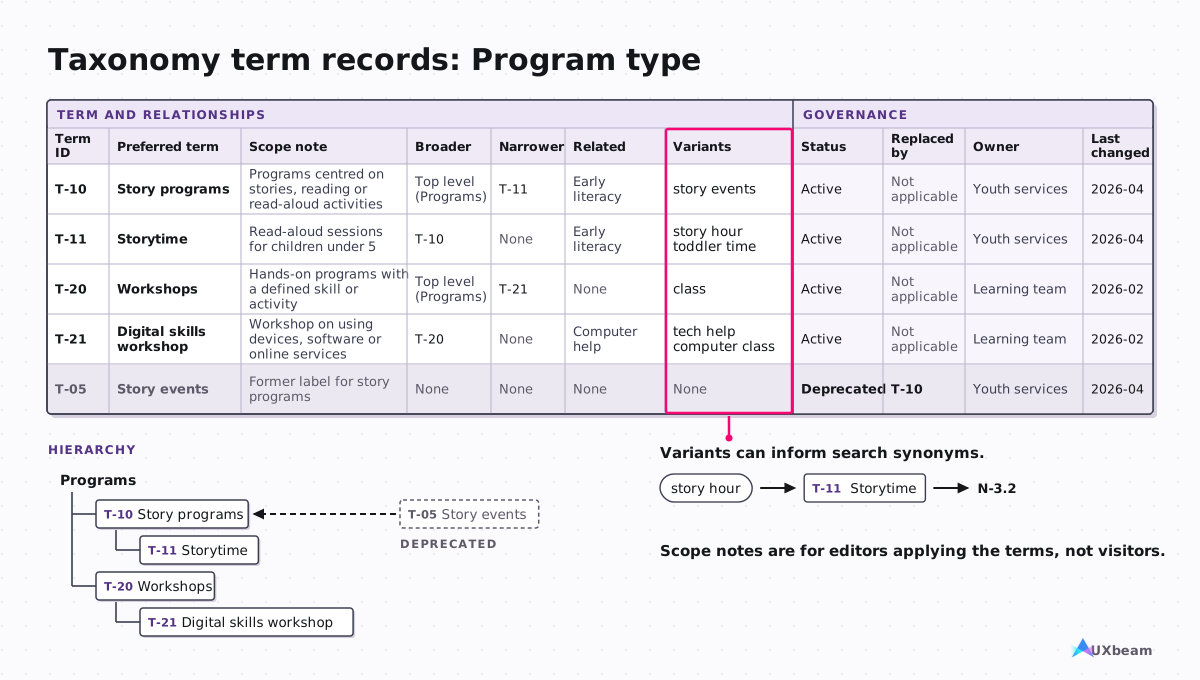
View copyable table
| Term ID | Preferred term | Scope note | Broader | Narrower | Related | Variants | Status | Replaced by | Owner | Last changed |
|---|---|---|---|---|---|---|---|---|---|---|
| T-10 | Story programs | Programs centred on stories, reading or read-aloud activities | Top level (Programs) | T-11 | Early literacy | story events | Active | Not applicable | Youth services | 2026-04 |
| T-11 | Storytime | Read-aloud sessions for children under 5 | T-10 | None | Early literacy | story hour; toddler time | Active | Not applicable | Youth services | 2026-04 |
| T-20 | Workshops | Hands-on programs with a defined skill or activity | Top level (Programs) | T-21 | None | class | Active | Not applicable | Learning team | 2026-02 |
| T-21 | Digital skills workshop | Workshop on using devices, software or online services | T-20 | None | Computer help | tech help; computer class | Active | Not applicable | Learning team | 2026-02 |
| T-05 | Story events | Former label for story programs | None | None | None | None | Deprecated | T-10 | Youth services | 2026-04 |
Metadata schema
| Field | Values from | Required | Multiple values | Used for | Applied by |
|---|---|---|---|---|---|
| Program type | Program type vocabulary | Yes | No | Event filters; search synonyms | Event editors |
| Audience | Audience vocabulary | Yes | Yes | Filters; related events | Event editors |
| Branch | Locations list | Yes | Yes | Location filter; hours | Event editors |
| Topic | Subjects vocabulary | No | Yes | Related content | Any editor |
Reference examples: SKOS Simple Knowledge Organization System Primer [6] · GOV.UK Taxonomy principles [7]
Content model
- What it is
- The content types, their fields and the relationships between types, often implemented in a CMS[8].
- Decision it informs
- What structured content exists and how it is reused, so templates and the CMS can be built without guessing.
- Typical format
- One card or table per content type. Make the relationships between types explicit; a diagram helps.
- Made by → acted on by
- Often made by an IA or content strategist with a developer; used by developers and editors.
- Ready when
- Every type lists its fields with field type, required and repeatable settings.
- Relationships between types are explicit.
- Classification fields name the vocabulary they use.
- Help text exists where editors need guidance.
- A developer or CMS implementer has reviewed the model before build.
- Weak vs good
- Weak: a list of page templates with no fields. Good: types, fields, links and help text, with the source of any data that comes from another system named.
- Needed for
- Usually core for: large catalogue, CMS migration or multi-site. See the reasons in the matrix
This example shows types, fields, field types, required and repeatable settings, relationships and help text for editors. A CMS implementation adds more: validation rules, machine names, translation and permissions.
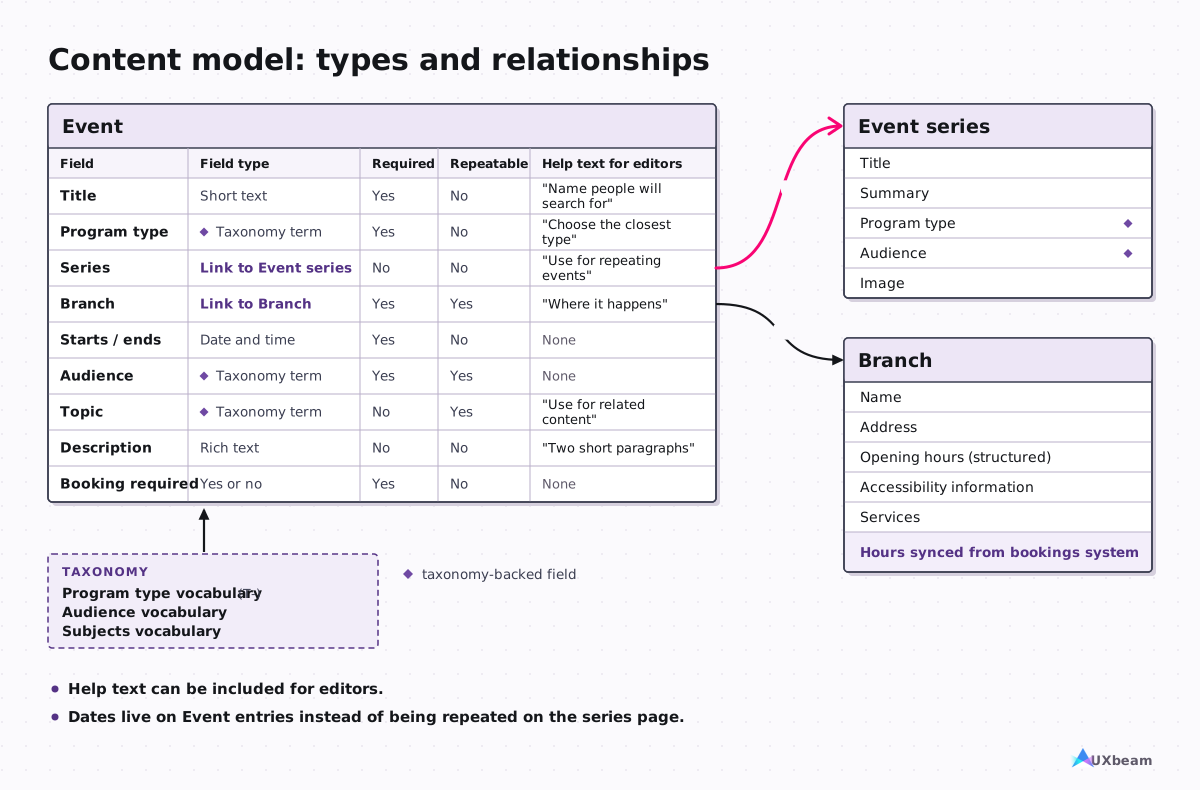
Fields of the Event content type
View copyable table
| Field | Field type | Required | Repeatable | Help text for editors |
|---|---|---|---|---|
| Title | Short text | Yes | No | Name people will search for |
| Program type | Taxonomy term (Program type vocabulary) | Yes | No | Choose the closest type |
| Series | Link to Event series | No | No | Use for repeating events |
| Branch | Link to Branch | Yes | Yes | Where it happens |
| Starts / ends | Date and time | Yes | No | None |
| Audience | Taxonomy term (Audience vocabulary) | Yes | Yes | None |
| Topic | Taxonomy term (Subjects vocabulary) | No | Yes | Use for related content |
| Description | Rich text | No | No | Two short paragraphs |
| Booking required | Yes or no | Yes | No | None |
Links between types: each Event belongs to at most one Event series; an Event can happen at several Branches. Branch opening hours come from the bookings system, which stays the source of truth. Storytime dates now come from Event entries instead of being typed into the page (INV-003).
Reference examples: Content Modelling: A Master Skill [8] · Model Your Content [9]
Research and validation findings
- What it is
- Summaries of what research showed about the structure. Two kinds are common: card-sort findings, about how people group and name content, and tree-test findings, about whether people can find things in an existing or proposed structure.
- Evidence it provides
- Card-sort findings inform candidate structures. Tree-test findings show, task by task, where people found the right place and where they ended up instead. Each supports a decision about the structure; neither is the structure.
- Typical format
- A useful reporting format is a table per study, with the number of participants, the date or study snapshot, and the decision each finding informed. Tree-test results are reported per task.
- Made by → acted on by
- Made by the researcher; used by the IA lead and whoever approves the structure.
- Ready when
- Each finding states the study type, sample size, and the study date or snapshot/version it comes from.
- Each finding that affects the structure links to the decision or decisions it informed.
- Caveats sit next to the numbers they qualify.
- Tree-test results are reported per task, with no single pass mark.
- Weak vs good
- Weak: "most people succeeded", with no task, no count and no decision. Good: per-task results with counts, where people went instead, and the change it led to.
- Needed for
- Usually core for: redesign or consolidation, large catalogue. See the reasons in the matrix
Card-sort findings
UXbeam case excerpt Government services, open card sort with 20 cards, 69 participants in the analysed snapshot. From the government services case.
| Finding | Evidence | Labels participants used | Implication for candidate structures |
|---|---|---|---|
| Topic-based mental model was dominant | UXbeam Mental Model Detection: 57 of 69 participants in the topic-based mental model | Housing, Education, Employment, Childcare, Care, Financial support | A topic-based candidate sitemap |
| A smaller action-based mental model was also detected | UXbeam Mental Model Detection: 9 of 69 participants in the action-based mental model | "Find", "Apply", "comparing and understanding options", "challenge decisions" | A second, action-based candidate sitemap to test against the first |
- Both mental models were detected in the same open sort and are subsets of the same 69-participant sample, not separate studies.
- In a later snapshot of 82 responses, the action-based mental model was no longer detected separately.
- No tree test of these two candidates is published.
Tree-test findings
UXbeam case excerpt E-commerce seller admin, an initial tree and a substantially revised iteration tested concurrently in April 2025; a later iteration followed. From the e-commerce navigation case.
Here, Direct means the participant finished at a correct destination without backtracking; Elsewhere means they finished at a wrong destination.
| Task | Version | Direct | Other evidence | Interpretation / next step |
|---|---|---|---|---|
| Pause notifications for the weekend. | Initial | 27% (16 of 59) | First clicks split: Add new 37%, Customer management center 34%, Manage orders/sales 17% | The original label split first clicks across three areas; compare a clearer label. |
| Pause notifications for the weekend. | Iteration 1 | 46% (31 of 67) | 57% chose the renamed menu first | Re-test with task wording that does not repeat "Notifications". |
| Set up an automated email asking buyers to review their order. | Initial | 9% (5 of 54) | Elsewhere 87% (47 of 54); 26 of 54 ended at the near-identical label "Auto send review request" | Resolve the two near-identical labels. |
| Set up an automated email asking buyers to review their order. | Iteration 1 | 30% (19 of 63) | The result partly reflects a corrected answer key and small task-wording edits | Keep the task unresolved; the answer-key change and small task-wording edits prevent a clean comparison. |
- The published case notes small wording edits to the review-email task between Initial and Iteration 1; the table uses a shortened task label for both rows.
- The renamed notification menu repeats a word from the task, so the 46% result cannot be attributed to the structure alone.
- Results are per task. There is no universal pass mark.
How to run and read these studies: Card sorting analysis and How tree testing works. To interpret results for a decision about an existing structure, see the assessment guide.
Migration map and redirects
- What it is
- A spreadsheet that records what happens to every old URL: its replacement and redirect, its content action, or its retirement.
- Decision it informs
- Where each existing page goes, what happens to its content, and which old addresses redirect where. The pattern for new URLs is decided once and recorded in the decision log.
- Typical format
- A spreadsheet linked to the inventory by ID. Disposition comes from the inventory; Content action records what happens during the migration. It stays a working document until launch.
- Made by → acted on by
- Made by the content or IA lead with content owners; used by developers and editors at launch.
- Ready when
- Every old URL either has its own row or falls under a pattern rule.
- Every row records a destination or retirement decision, or is marked Unresolved with a reason.
- Redirects point only to a relevant replacement; otherwise the URL is retired according to the site's policy.
- No redirect leads to another redirect.
- Pattern rules for large groups of URLs, such as a whole folder, have their own rows.
- Weak vs good
- Weak: every retired page redirected to the home page. Good: every old URL is covered by a row or pattern rule, redirects exist only where a relevant replacement exists, each active decision has an owner and status, and unresolved rows say why.
- Needed for
- Usually core for: CMS migration or multi-site. See the reasons in the matrix

View copyable table
| Old URL | Old title | Inventory ID | Disposition | New node | New URL | Redirect | Content action | Owner | Status | Notes |
|---|---|---|---|---|---|---|---|---|---|---|
| https://library.example.org/visit/hours | Opening hours | INV-001 | Merge | N-2.1 | https://library.example.org/visit/hours-and-locations | Permanent | Merge | Branch services | Done | None |
| https://library.example.org/about/hours-and-locations | Hours and locations | INV-002 | Merge | N-2.1 | https://library.example.org/visit/hours-and-locations | Permanent | Merge | Communications | Done | Summer hours removed |
| https://library.example.org/kids/storytime | Storytime | INV-003 | Revise | N-3.2 | https://library.example.org/events/storytime | Permanent | Rewrite | Youth services | In progress | Dates move to event entries |
| https://library.example.org/news/2019-renovation | Renovation update 2019 | INV-004 | Remove | None | None (retired) | None | Retire | Communications | Agreed | No relevant replacement; retired per site policy |
| https://library.example.org/services/printing | Printing and scanning | INV-005 | Revise | N-2.4 | https://library.example.org/visit/printing-and-scanning | Permanent | Rewrite | IT | Not started | None |
| https://library.example.org/ebooks-help | E-books help | INV-006 | Unresolved | Not decided | Not decided | Pending | Not decided | Digital services | Open | Blocked on decision D-03 |
Download the template: Content migration map (XLSX) · blank CSV. Free to use under CC BY 4.0.
Reference examples: The art of redirection [13] · Using the Redirect Spreadsheet for Website Migration [14]
Decision log and governance
- What it is
- A decision log that records structural decisions and their reasons, and a short set of rules for who may change the structure, terms and labels later.
- Decision it informs
- Why the structure is the way it is, who can change it, and what triggers a review.
- Typical format
- Two tables. When a decision changes, keep the earlier entry and mark it superseded rather than deleting it. This page uses a lightweight version of software architecture decision records[15][16]. Editor guidelines can sit alongside these rules when needed.
- Made by → acted on by
- Kept by the IA lead, then handed to the product or content owner; used by future teams and editors.
- Ready when
- Every major structural decision has a row with options, evidence and reason.
- Superseded decisions are kept and marked.
- Each kind of change has a named proposer and approver.
- Reviews have named triggers, a schedule, or both.
- Weak vs good
- Weak: decisions that live only in meeting notes. Good: a dated log that links each decision to its evidence and to the deliverables it changed.
- Needed for
- Usually core for: redesign or consolidation, app or product, large catalogue, CMS migration or multi-site. See the reasons in the matrix
Spencer emphasizes documenting the rationale behind the IA and how it will be maintained[17].
Decision log
| ID | Decision | Options considered | Evidence | Rationale and trade-off | Decided by | Affects | Revisit if | Status |
|---|---|---|---|---|---|---|---|---|
| D-01 | Organize the top level primarily by task, with one audience-specific exception. | By audience; by task | Card-sort findings and top-tasks research (not shown) | Most tasks are shared across audiences; Kids and teens remains an audience-specific section for services that do not fit the shared task structure. | IA lead and web steering group | N-1 to N-6 | A new audience-only service area is added | Accepted |
| D-02 | One page for hours and locations | Keep two pages; merge | INV-001 and INV-002; support questions | Duplicate content with conflicting hours | Content lead | N-2.1; migration rows for INV-001 and INV-002 | Not applicable | Accepted |
| D-03 | Where e-books help belongs | Under Borrow; under a Help section | Not yet tested | Owners disagree; a tree-test task is planned | Not decided | N-1.3; INV-006 | Not applicable | Open |
Governance rules
| Change | Who proposes | Who approves | Where recorded | Review when |
|---|---|---|---|---|
| New top-level section | Any team | Web steering group | Decision log | Before the section launches |
| New taxonomy term | Editors | Taxonomy owner | Term record | When people often search for a variant that has no preferred term |
Reference examples: Documenting Architecture Decisions [15] · About MADR: Markdown Architectural Decision Records [16]
Also part of the set
Research inputs
Stakeholder interviews, user research, support tickets, top tasks, analytics and site-search logs. They often feed the audit and the structure; on some projects the research synthesis is handed over as a deliverable in its own right. Ready when the sources and their dates are recorded and each structural decision can point to the input it used.
Search synonyms
How site search uses the taxonomy: which words people use, and which preferred term or destination each one maps to. Ready when each search term or synonym in the table maps to a preferred term or destination.
| People search for | Preferred term or page | Goes to |
|---|---|---|
| story hour | Storytime (T-11) | N-3.2 |
| opening times | Hours and locations | N-2.1 |
| tech help | Digital skills workshop (T-21) | Events filtered by T-21 |
| Printing and scanning | N-2.4 |
Object model
For applications and other object-driven systems: the main things people work with, such as orders, reports or users, and how they relate. It often shapes navigation more than a page hierarchy does. Ready when each object, its relationships and the places it appears are listed.
Ready, accepted and owned
What the handover needs
The deliverables your project uses, in editable source formats, with a record of the major decisions behind them. A PDF alone is not a maintainable source file. This IA handover is separate from the design handoff covered in From sitemap to wireframe.
Cross-deliverable acceptance checklist
Each entry above has its own "Ready when" list. These checks apply across the whole set.
- Every deliverable names the decision or action it supports.
- Every deliverable has a named owner while it is active; maintained deliverables also have an owner after launch.
- The editable source files exist and are part of the handover, not only exported views.
- IDs and labels agree across related deliverables: inventory, structure, navigation and migration map.
- Unresolved decisions are marked as unresolved, with a reason and an owner.
- Evidence and rationale can be traced from each structural decision to the finding or input behind it.
- Related downstream deliverables reference the same current version of the structure.
- Anything still changing before launch, such as the migration map, carries a version or status. Maintained deliverables such as the taxonomy continue versioning after launch.
- Significant changes are recorded in the decision log.
- Reviews happen on named triggers, on a schedule, or both.
- If testing is planned, the decision criterion and what the team will do if the result does not meet it are agreed before the study.
Who owns what
| Deliverable | Produces | Approves | Uses | Maintains after launch |
|---|---|---|---|---|
| Inventory and audit | Content or IA lead | Content owners | IA lead, content lead | Content team |
| Structure specification | IA lead | Product or content owner | Designers, developers, content owners | Product or content owner |
| Taxonomy and metadata | Taxonomy owner | Content owner | Editors, developers, site search | Taxonomy owner |
| Content model | Content strategist with a developer | Product owner | Developers, editors | Development team |
| Findings | Researcher | Not applicable | IA lead, approvers | Research team (archive) |
| Navigation specification | IA or UX designer | Product owner | Developers, designers | Web team |
| Migration map | Content or IA lead | Content owners | Developers, editors | Web/SEO team (redirects); map archived after verification |
| Decision log and governance | IA lead | Steering group | Future teams, editors | Product or content owner |
Roles vary; before launch, name a person for each role that applies (produces, approves, maintains).
A test for any proposed deliverable
Before agreeing to make or pay for a deliverable, ask:
- What decision does it support?
- What evidence or reasoning does it carry?
- Who acts on it, and in what format do they need it?
- How will we know it is ready?
- What does the client or the team have to supply for it?
Templates and next steps
Templates
- Content inventory and audit template (XLSX) · blank CSV
- Content migration map template (XLSX) · blank CSV
Each XLSX has a Read me tab, the library example and a blank sheet with dropdowns. Free to use and adapt under CC BY 4.0.
Related guides
The Research and validation findings deliverable can include results from card sorting and tree testing. UXbeam runs both studies and can create an editable draft hierarchy from card-sort results for you to review and test. The other deliverables on this page are created in your own tools; the templates above are a starting point.
Sources
- Kaley, A. "Content Inventory and Auditing 101." Nielsen Norman Group, 2020.
- State of Iowa Digital Experience. "How to Do a Content Audit." Digital Experience training.
- Tankala, S. "Information Architecture vs. Sitemaps." Nielsen Norman Group, 2023.
- Withrow, J. "Site Diagrams: Mapping an Information Space." Boxes and Arrows, 2004.
- Laubheimer, P. "Taxonomy 101: Definition, Best Practices, and How It Complements Other IA Work." Nielsen Norman Group, 2022.
- Isaac, A. and Summers, E. (eds.) "SKOS Simple Knowledge Organization System Primer." W3C Working Group Note, 2009.
- GOV.UK. "GOV.UK Taxonomy principles." Government Digital Service, 2019.
- Lovinger, R. "Content Modelling: A Master Skill." A List Apart, 2012.
- Vilhauer, C. and Barker, D. "Model Your Content." In The Web Project Guide, chapter 11. Blend Interactive.
- Laubheimer, P. "Local Navigation Is a Valuable Orientation and Wayfinding Aid." Nielsen Norman Group, 2021.
- GOV.UK Design System. "Navigate a service." Government Digital Service.
- U.S. Web Design System. "Side navigation." General Services Administration.
- Mann, D. "The art of redirection." Inside GOV.UK, 2014.
- Stony Brook University Web Support. "Using the Redirect Spreadsheet for Website Migration."
- Nygard, M. "Documenting Architecture Decisions." 2011.
- "About MADR: Markdown Architectural Decision Records." Version 4.0.0, 2024.
- Spencer, D. A Practical Guide to Information Architecture, 2nd ed. UX Mastery, 2014.
Study data: UXbeam card sorting and tree testing case studies linked in the findings entry.