Leading tasks in tree testing: how to spot and rewrite them
By UXbeam, information architecture tools and services since 2021 · Updated August 9, 2026
In tree testing, leading tasks are those whose wording contains or mirrors labels from the tree being tested, so participants can succeed by matching words instead of navigating by meaning. They inflate success rates and hide the structural problems a tree test exists to find.
A task that reuses the tree's own labels, letting participants match words instead of navigating.
They inflate direct success rates and mask the very problems the test should surface.
Describe a realistic situation and need instead of the interface, then re-check the rewrite against every label in the tree.
Why leading wording distorts a tree test
A tree test asks one question: given only your labels and hierarchy, can people work out where things live? A task that repeats a tree label answers that question for the participant. As Nielsen Norman Group puts it, when words from the interface appear in your task you are "testing your participants' reading comprehension and ability to find matching words, rather than your labels and navigation," and at worst the findings are "directly misleading and cause you to make the product worse." The same trap appears in usability testing, where a task that names the button or menu to click hands over the answer the study means to measure. In a tree test the give-away is a label; the fix is the same.
A leading task's results look excellent: high direct rates, confident first clicks, short paths. But did the structure guide them, or did the words match? Dave O'Brien, whose book on tree testing remains the standard reference, calls give-away words "the most common cause of bad tasks, by a long shot": we want a participant to pick a topic because it looks like the best option, "not because of simple word-matching."
Obvious, moderate, and subtle leading
Overlap between task wording and tree labels comes in degrees. Triage your tasks by where the echoed word lives, the same order of severity UXbeam's setup check uses:
The task repeats a top-level menu label. Top-level labels are the first thing every participant reads, so the task effectively highlights the correct first click. First-click data becomes meaningless for that task.
"Where would you schedule a payment?" Payments is a top-level menu label.
The task repeats the destination's own label. Participants still choose the right branch themselves, but the final hop is given away. You learn whether people find the neighborhood, not the house.
"Check whether gift cards are available." Gift cards is the destination's own label.
The task echoes a word elsewhere in the tree, or mirrors a sequence of tree terms. O'Brien notes that even matching the tree's order of terms can give away a path. Subtle overlap is sometimes acceptable, as long as you chose it on purpose.
"Stop the app from sending you security alerts." The target is Notifications, but Security sits elsewhere in the tree.
Before and after: three rewrites
The reliable pattern, recommended across the literature, is to describe a realistic situation and need instead of the interfaceNN/gNielsen Norman GroupTurn User Goals into Task Scenarios for Usability TestingGOV.UKGOV.UK Service ManualUsing moderated usability testing. Consider this fragment of a banking app's tree:
Leading: "Where would you schedule a payment?"
Why it leads: "payment" matches the top-level label Payments and the destination Scheduled payments. Participants can word-match twice.
Better: "Your rent is due on the 1st of every month. Set it up so it's paid automatically."
| Leading task | Why it leads | Rewrite |
|---|---|---|
| "Check whether gift cards are available." | "Gift cards" is the destination label, verbatim. | "You want to give a friend something from this store, but let her pick it out herself." |
| "Update your benefits enrollment." | "Benefits" is a top-level section of the HR portal's tree. | "Your baby arrived last month. Make sure your family's health coverage includes her." |
One caution when rewriting: don't swing into long fiction. NN/g's tree-testing guidance warns that participants skim, and important details "buried in a lengthy story" get missed. One or two sentences of concrete scenario is the target.
When matching terminology is legitimate
Avoiding tree words is a strong default with exceptions. Three situations make the tree's own terms a sound, deliberate choice:
- Control tasks. A task that intentionally reuses exact tree wording establishes a baseline: if participants can't succeed even when handed the words, something deeper is wrong. Dan Brown's task taxonomy for navigation testing includes exactly this type (an easy, exact-vocabulary task used "like a control"), alongside its opposite, the synonym task.
- Label comprehension tests. When the question is whether a label itself communicates, you test it head-on: ask about the concept in different words (Brown's "thesaurus" pattern), or run two tree variants with alternative labels for the same category and compare, as NN/g recommends for label choices.
- Established terms. If a concept has one standard, well-known name, a contorted paraphrase confuses more than it protects. McCloskey's classic NN/g piece makes the exception explicit: when avoiding the interface word is unnatural, "you may want to use the established term."
The line between all three and a leading task is intent: a deliberate match is chosen, documented, and read accordingly; an accidental match silently inflates your results.
What doesn't automatically count as leading
- Function words don't lead. "Your", "where", "find", "make" overlap with any realistic tree. Automated checks (UXbeam's included) filter them with a stopword list, along with very short words.
- Plurals and near-forms do lead. "Payment" versus "Payments" is the same match to a participant scanning labels; treat singular/plural variants of a tree label as the label.
- Domain vocabulary is a judgment call. Shared, generic domain words ("account" on a banking site) may be unavoidable; the question is whether the overlap points at one branch or is spread across the tree.
A three-step rewrite method
- Swap the label for its consequence. Not "change your notification settings" but "you're getting too many emails from the app. Make them stop."
- Add one concrete scenario detail. Specifics ("your rent", "the 1st of every month") give participants an intent to pursue rather than a phrase to locate. It is the goal-based framing both NN/g and the GOV.UK Service Manual prescribe for unbiased tasks.
- Re-check the rewrite against the whole tree. A rewrite that dodges the destination label but picks up a top-level label has traded one leak for a worse one.
These three steps are the short version of a fuller method for writing goal-based tasks: the Job-Shaped Task.
Task-review checklist
- Read each task against your top-level labels first. Any shared word or its plural is the highest-priority rewrite.
- Then check each task against its correct destinations' labels, and watch for matching sequences of terms, not just single words.
- Mark any deliberate exact-wording task as a control so you read its results as one.
- Keep tasks human: one or two sentences, no essays.
- After launch, be most skeptical of your best-looking tasks.
How UXbeam supports task review and iteration
UXbeam builds this review into the workflow at both ends of a study.
1Detect
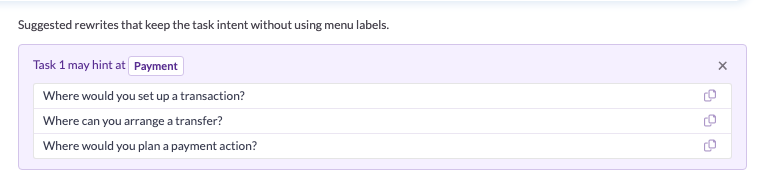
During setup, an optional check (Check tasks for leading menu words) compares each task's wording against your tree's labels, ignoring stopwords and very short words and treating singular/plural variants as matches. Overlaps are flagged by severity, top-level menu matches first, and each flagged task gets up to three suggested rewrites that avoid the tree's vocabulary:
2Review
The check runs again where it matters most: on results. When participants converge on a destination whose label appeared in the task text, the task is flagged so you can discount that convergence honestly. The match between the instruction and where people clicked is marked right in the results row:

3Interpret
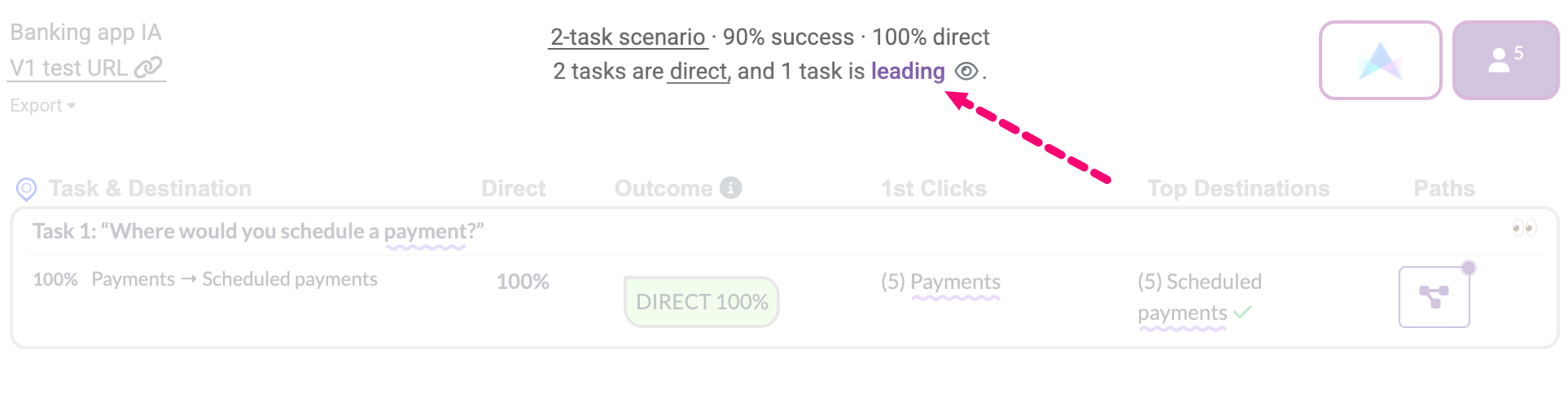
When you iterate, flagged tasks are pre-selected for the next version, so rewording and re-testing is the path of least resistance. None of this replaces judgment: UXbeam flags overlaps and suggests alternatives, but whether a match is an accident or a deliberate control is the researcher's call.
Frequently asked questions
Is it always wrong to use the tree's own words in a task?
No. Reusing a label is wrong only when it is accidental. Deliberate exact-wording tasks can act as a control, and synonym tasks test whether a label communicates its meaning. What matters is that you chose the wording on purpose and read the results accordingly.
Do I have to rewrite every flagged task?
No. A flag is a prompt for judgment, not an order. If the overlap is deliberate (a control task or an established term your users universally know), keep the wording and note the decision. Rewrite when the overlap is accidental.
What if the established product term is the only natural wording?
If a concept has one standard, well-known name, a roundabout paraphrase can confuse participants more than the term reveals. Usability researchers generally advise using the established term in that case. Do so knowingly, and read that task's results as label-assisted.
How does UXbeam help with leading tasks?
During setup, an optional check compares task wording against the tree's labels and flags overlaps, with up to three suggested rewrites that avoid the tree's vocabulary. On results, a task is flagged again when participants converged on a destination whose label appeared in the task.
Does a high success rate mean my task wasn't leading?
Not by itself. Leading tasks tend to produce high direct rates precisely because participants word-match. Treat a flagged task's direct rate as an upper bound, and confirm the finding with a reworded task in the next iteration.
References
- Amy Schade, "Write Better Qualitative Usability Tasks: Top 10 Mistakes to Avoid", Nielsen Norman Group, 2017.
- Marieke McCloskey, "Turn User Goals into Task Scenarios for Usability Testing", Nielsen Norman Group, 2014.
- Page Laubheimer, "Tree Testing: Fast, Iterative Evaluation of Menu Labels and Categories", Nielsen Norman Group, 2023.
- Dave O'Brien, "Writing a good task", in Tree Testing for Websites (companion wiki), 2024.
- Government Digital Service, "Using moderated usability testing", GOV.UK Service Manual, 2017.
- Dan Brown, "Five essential questions for testing navigation", EightShapes, 2019.