Path replay
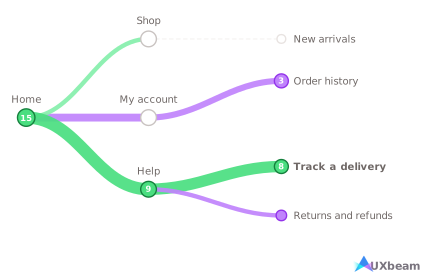
Replay makes participant paths easy to read at a glance, so teams can see where participants converge, scatter or backtrack without decoding an aggregate chart.
Test labels and grouping while they are still easy to change, before design and engineering commit to them.
Check whether a user seeing it for the first time can find each new area.
When analytics reveal drop-off, use tree testing to audit navigation and identify weak labels or structural problems.
Participants navigate a text-only version of your structure.
“You need to change the delivery address for an order.”
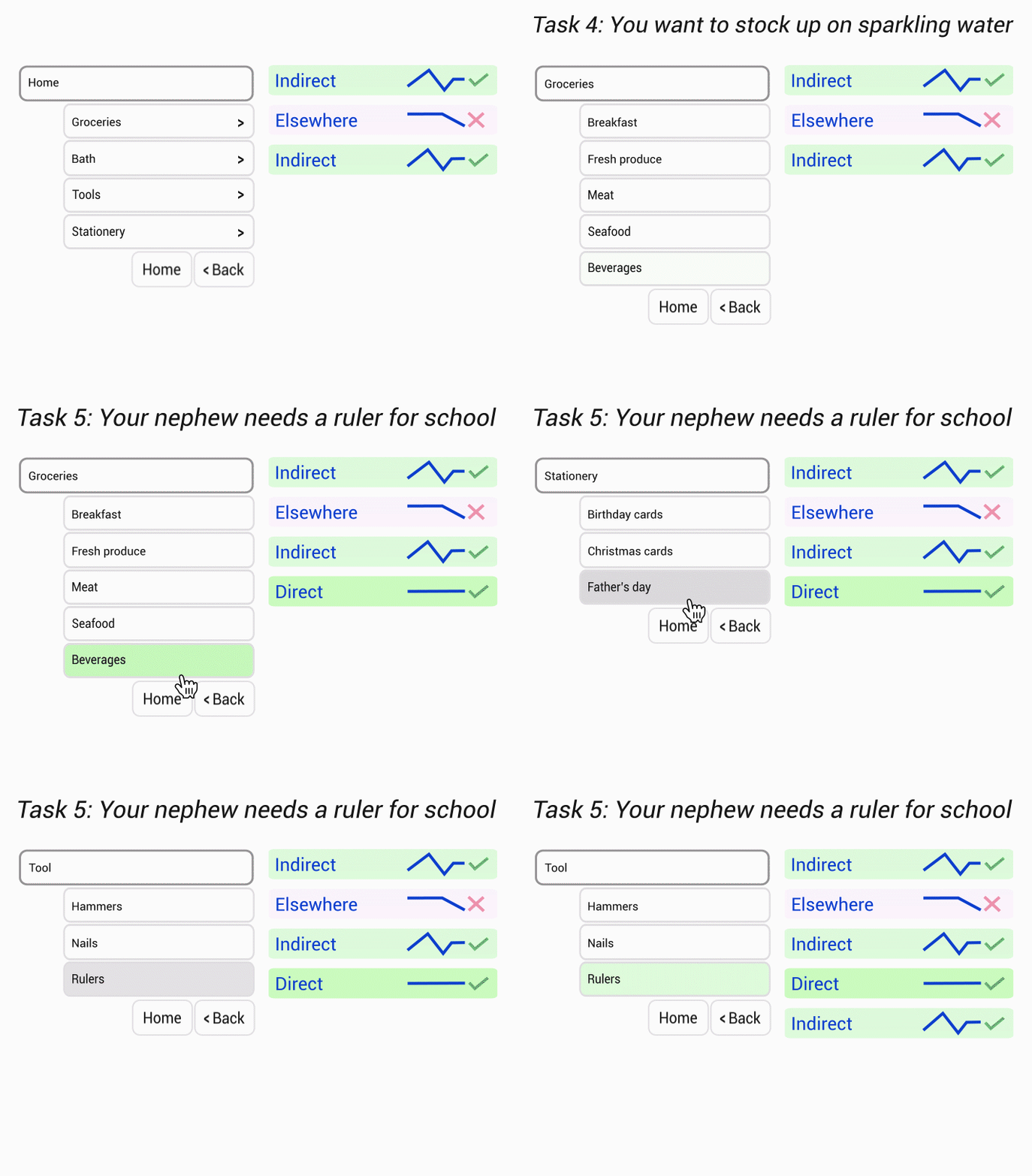
Where participants first expected the answer to be, before exploring anywhere else.
Where participants decided the content belonged, including the incorrect destinations they settled on.
The route each participant took, including backtracking and repeated wrong turns.
See direct, indirect and elsewhere outcomes at a glance, then open any segment to inspect the participant paths.
How long each navigation choice took.
Every participant's attempts across the whole study.
Only in UXbeam
UXbeam goes beyond task success: catch biased tasks, replay the paths participants took, and get suggestions for improving the next version.
01
Only in UXbeam
A stakeholder-drawn structure may reflect assumptions participants don’t share.
If revisions stall, bring in a card-sort sitemap built from participant groupings.
It is easy to get stuck with a structure that stays passable through sensible tweaks and miss the better one you never tested. When revisions stop improving findability, bring in a card-sort sitemap and test an alternative structure based on participant groupings.
A task that repeats a tree label turns findability into word matching.
UXbeam flags revealing wording as you write and suggests alternatives.
Leading tasks are a major source of bias. They can turn a findability test into a reading task, where participants can match words instead of navigating by meaning. To avoid artificially increasing success rates, UXbeam can flag the task and overlapping terms and suggest rewordings.
Leading wording can make a task look easier than the navigation really is.
UXbeam checks completed results too and shows the overlapping terms.
Catching leading wording before launch is not foolproof. Some slips through, and a task can score direct for the wrong reason. UXbeam can run the check again on completed results and flag any task that shares wording with a top-level label.
02
Replay makes participant paths easy to read at a glance, so teams can see where participants converge, scatter or backtrack without decoding an aggregate chart.
Make the routes participants used stand out. Branch thickness shows traffic. Low-traffic branches can be hidden to clear the noise.
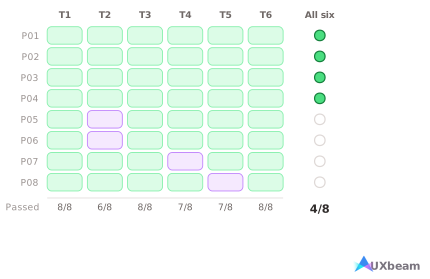
Every task can look acceptable while few participants finish the whole journey. UXbeam counts who does, and names the task where the rest diverge.
03
UXbeam connects card sorting, editable sitemaps and iterative tree testing in one workflow. Start with participant groupings, test the resulting navigation, diagnose where it breaks, then revise to improve findability.
Bring your own participants for free, or recruit through UXbeam with AI targeting and screening.
Availability and pricing depend on your audience and screening.
Export your studies in formats you can reuse and share.
Every response stays inspectable next to the aggregate, with the complete analysis.
Every participant-by-task attempt, ready for Excel or statistics tools.
The complete tree and task set as plain text, for tickets or version history.
SVG menu cards for stakeholder review; any path view copies as an image.
Product analytics can show where users drop off or struggle. A tree test isolates the navigation so you can see whether labels or structure are causing the problem, including participants’ first choices, paths, backtracking and final destinations.
Use card sorting when you need to learn how participants group the content. Use tree testing when you have a candidate structure and need to know whether users can find what they need. Many teams run a card sort first, build a candidate sitemap from it, and tree test that.
Free tree testing tools often limit response counts or access to results. On UXbeam there is no cap on studies or on participant responses, every collected response is viewable, the complete analysis is included, and you can export participant-level results at no cost.
Paste an indented outline, upload a CSV or TXT file, or import a candidate structure from a UXbeam card-sorting study.
UXbeam separates three outcomes rather than scoring every arrival the same way: Direct, the correct destination with no backtracking; Indirect, the correct destination reached after a detour; and Elsewhere, an unexpected destination. A high total that is mostly indirect is a different finding from one that is mostly direct.
A task that repeats a label from your tree turns findability into word matching. UXbeam checks your task wording against your own labels while you write and suggests less revealing alternatives. The same check runs again on completed results, marking any task whose wording overlaps the destination participants chose.
Yes. Mark several destinations as acceptable when a task has more than one valid answer, and designate a parent category when you want to learn which child item participants associate with the task rather than forcing one final destination.
Yes. Create a revision from the same tree and tasks instead of rebuilding the study. Each version keeps its own results, and UXbeam marks the versions where more tasks were found directly, so you can see what a change moved.
No. Participants open the study link in their browser and complete the tree test without installing anything or creating a UXbeam account.
Yes. The participant experience works in mobile and desktop browsers.
Yes. Bring your own participants at no recruitment cost, or recruit through UXbeam’s paid participant panel. Get access to 300K+ participants, with recruitment supported in 50 countries, audience targeting, and screening questions. Five study languages are supported. Recruitment starts at $1 per participant-minute.
Absolutely. You can pause and resume recruitment, stop an order, or add participants with a new order. If you stop, we refund any unfilled participant places and unused screening allowance.
Participant-by-task results as CSV, the complete tree and task set as plain text, and proposed sitemap screens as SVG menu cards. Every individual participant attempt stays inspectable in the results alongside the aggregate.
