How to Write Task Instructions for Tree Testing
By UXbeam, information architecture tools and services since 2021 · Updated August 9, 2026
At UXbeam, we recommend writing every tree-test and usability-test task as one sentence, in a format we call the Job-Shaped Task.
One sentence, up to three clauses (situation, intent, outcome), written in a "you" voice.
A task built from a goal tells participants what to achieve, not where to go. That is the difference between measuring findability and measuring word-matching.
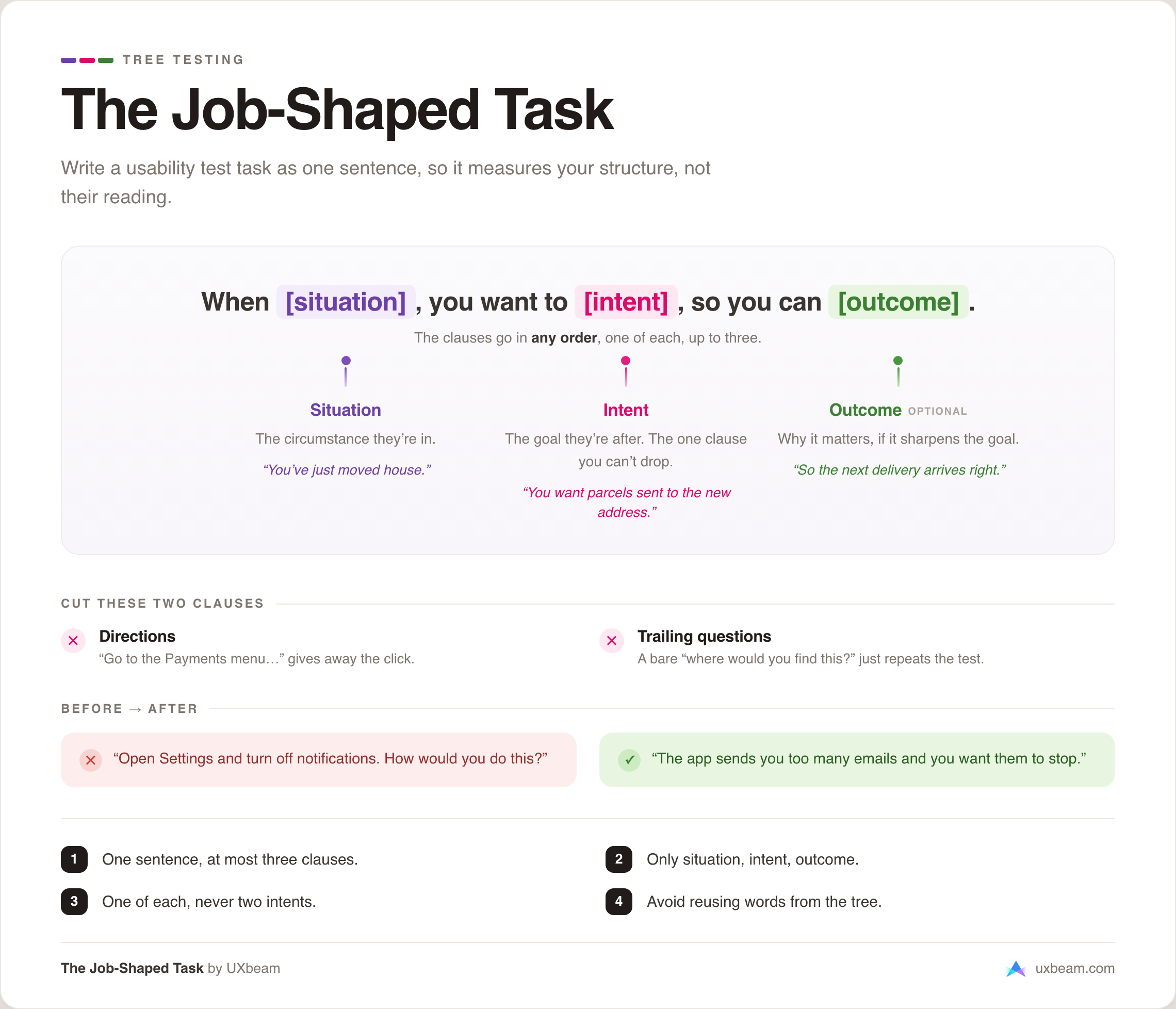
Fill a job story: when [situation], I want to [intent], so I can [outcome]. Then cut anything that is not one of those three.
We have found it a natural way to make a task clear. It tells participants what they are trying to accomplish without ever naming where to click, so your results reflect how people move through your structure, and the task stays light to read.
What a task instruction is
A tree-testing task is smaller than it looks. It is a single sentence, and every good one is built from the same few parts. Keep it to one sentence, write it in the second person, and cap it at three clauses. Every clause you add works against clarity: more to read and misread, more room to take the task in a direction you did not mean, and one more chance to lead the participant toward an answer. Short keeps it clear.
The reliable way to hit that shape is to describe the participant's goal, not your interfaceNN/gNielsen Norman GroupTurn User Goals into Task Scenarios for Usability Testing. A goal-shaped task names a situation and a need; name the button instead and you have stopped testing navigation. Every rule below follows from that one choice.
The job-story format
The shape to reach for is a job story, a format Alan Klement introduced as an alternative to the user story: instead of "As a user, I want X," a job story reads "when [situation], I want to [motivation], so I can [expected outcome]." If your team already works in job stories, you know this shape, and a Job-Shaped Task is the same sentence with the participant in the "you" seat.
the situation the participant is dropped into.
the intent: the goal they are trying to reach.
the outcome: what reaching it gives them.
That template shows the most familiar order, but the clauses rearrange freely. Because situation, intent, and outcome are clause types, they slot in any order: "Now that you have moved, you want your parcels sent to the new address" leads with the situation, while "You want your parcels sent to the new address, now that you have moved" leads with the intent. Both are valid Job-Shaped Tasks.
There is a mechanical reason the shape works. A job story describes what a person is trying to get done rather than the feature that does it. So it cannot name a menu label, the wording that turns a findability test into a reading test. Good structure prevents the most common bias before you go looking for it. Where a leading word slips in anyway, spotting and rewriting leading tasks is its own method.
The job story makes a good shared anchor because it is already familiar to everyone around the table. At UXbeam, we refined it into a small taxonomy and a few rules, so that even people new to tree testing can jump in gracefully.
The three clauses: situation, intent, outcome
Those three are the whole taxonomy.
Situation
The realistic circumstance the participant is in. "You have just moved house." It sets the scene without pointing anywhere.
Intent
What they want to do, stated as a goal. "You want your parcels sent to the new address." This is the one clause a task cannot do without.
Outcome
Why it matters, when it sharpens the goal. "So the next delivery arrives at the right place." Skip it if the intent already stands alone.
Use each type once. Two intent clauses put two goals in one task: the participant chases one, or splits between them, and the first click can no longer tell you which goal drove it. You have folded two questions into one, with a chance one gets lost, because each participant will focus on whichever goal they noticed most. A second situation or outcome only pads. So if a task seems to need two goals, it should be two tasks.
Three clauses at the most. The ceiling is about cognitive effort: a task is read once, quickly, and held in limited working memory. Pile on clauses and participants do not keep them all in view; each person latches onto whichever clause is most salient to them. Different readers fix on different parts, so they end up answering different questions, and their first clicks scatter.
Read that scatter as an artifact of the task: the tree or navigation may be sound, but the overloaded task pulled the participants apart. Keep the task focused on one goal so you can interpret where participants go.
Clauses that do not belong
Anything that is not a situation, intent, or outcome is padding, and sometimes bias. Two clause types do the most damage, and three more show up almost as often.
Directions tell the participant where to go.
Leading: "Go to the Payments menu and set up a standing order."
Why it breaks: the task hands over the first click. You learn whether people can follow an instruction, not whether they can find Payments on their own.
Better: "Your rent is due on the 1st of every month. Set it up to pay automatically."
Trailing questions tack a bare "where would you find this?" onto a clause that already stated the goal.
Dead weight: "You want to update your password. Where would you find this?"
Why it breaks: "this" only points back at the intent you just wrote, and the whole tree test already asks "where would you find it." The trailing question adds nothing and nudges participants to justify a click rather than make one. Cut it.
Better: "You are worried your account is not secure and want to change your password."
The question mark itself is not the problem. "Where would you find gift cards?" is a fine intent, just phrased as a question, as long as its words do not echo a label in your tree. What breaks a task is the bare trailing "where would you find this, that, or it," pointing back at a goal another clause already carried.
Three more clause types are subtler, and each fails for its own reason:
- Feature clauses name the solution: "Use the bulk editor to update them all." They assume the participant already knows the feature exists and point straight at it, so you measure recognition of a named tool, not whether people would find it.
- Hint clauses suggest the answer: "It is probably under your account settings." Even a soft hint moves the first click. A task should never carry a guess about where the answer lives.
- Backstory clauses pad the persona without changing the goal: "You are a busy parent of three who loves gardening, and one evening after work..." The extra reading buries the task, and as the three-clause limit explains, different readers latch onto different details.
Write one in three steps
-
Pick the clauses you need
Run through situation, intent, and outcome. Keep the ones that carry the task, describe each as a goal rather than an actionGOV.UKGOV.UK Service ManualUsing moderated usability testing, and put them in whatever order reads naturally. Often just an intent, sometimes two.
-
Trim everything superfluous
Step back and cut everything you can spare. Anything that is not a situation, intent, or outcome goes first: directions, trailing questions, feature names, hints, and backstory padding, each for the reason the section above gives. Then question the clauses that remain, and the words inside them. Every word you remove is one fewer chance to confuse or mislead, and because every participant reads the same task, each trim multiplies across your whole sample. Trimming is the key to task writing.
-
Check the wording against your tree
Read the sentence against every label in your structure. Any word that repeats a label lets participants match text instead of navigating. Swap it for a neutral synonym.
Before and after
Each rewrite below drops a direction or a trailing question and replaces it with a situation and a goal.
| Original task | What is wrong | Rewritten as a job story |
|---|---|---|
| "Open Settings and turn off notifications. How would you do this?" | A direction (open Settings) and a trailing question, stacked in one task. | "The app is sending you too many emails and you want them to stop." |
| "You need to add a payment method. Where would you go for this?" | A trailing "where would you go for this" that only points back at the goal already stated. | "You just got a new card and want to use it for your monthly subscription." |
| "Find the Rewards page and see if you have enough points." | A direction that names the destination, "Rewards," outright. | "You shop here often and want to know whether your loyalty has earned you anything yet." |
Of course, do not swing into fiction. A task buried in a paragraph of backstory gets skimmed, and the detail that matters gets lost. One sentence of concrete situation is all you need!
Task-design checklist
- One sentence, and no more than three clauses.
- Only situation, intent, and outcome clauses. No directions or trailing questions.
- At most one clause of each type. No task carries two intents.
- No word that repeats a label in your tree. When one is unavoidable, choose it deliberately and read that task's results as label-assisted. (More on leading terms.)
- Concise enough that a participant reads it once and understands the goal.
The one-page cheat sheet
Here is the method on a single page, free to save or use in training and facilitation:
How UXbeam helps as you write
UXbeam builds two of these checks into task setup, so the review happens while you write rather than after your participants have already answered.
1It flags the dead question clause
When a task ends in a "where would you find this" or "where would you go for this" clause, UXbeam flags it and suggests removing it. The tree test already asks that question, so the clause repeats the test and can steer the answer. Cutting it leaves the situation and goal that belong.
2It checks wording against your tree
The same setup step compares each task against your tree's labels and flags words that repeat one, with suggested rewrites that avoid the tree's vocabulary. That is the leading-term check covered in full in the leading-tasks guide. Between the two, a task that names the interface rarely reaches launch by accident.
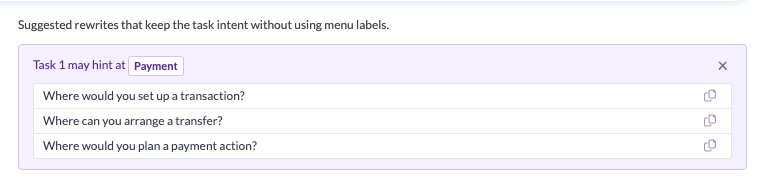
Both checks are optional, and we recommend leaving them on. They catch the two mistakes an occasional user is most likely to make (a leaked label, a dead trailing question), so those never skew a result, without anyone needing to hold the rules in their head first.
Frequently asked questions
Do I need all three clauses in every task?
No. One clear intent clause can be a complete task. The rule is a ceiling, not a quota: at most one situation, one intent, and one outcome, and never more than three clauses in the sentence.
Why can a task have only three clauses?
A task is read once and held in limited working memory. Past about three clauses, participants stop keeping them all in view, and each person latches onto whichever clause is most salient to them. Different readers end up answering different questions, so their first clicks scatter. When that happens, suspect the task before the tree: an overloaded task produces scattered clicks even when the structure is sound. One or two clauses, three at the most, keeps everyone answering the same question.
What is the difference between a job story and a user story?
A user story describes a feature for a delivery team: "As a user, I want X so that Y." A job story describes a situation and a goal without naming a solution: "When [situation], I want to [intent], so I can [outcome]." For a test task, the job-story shape matters because it states the goal rather than the interface, which is what keeps the task from giving away where to click.
Can a task be a question like "Where would you find gift cards?"
Yes, a question can be fine. "Where would you find gift cards?" is an intent phrased as a question, and it works as long as its words do not echo a label in your tree. What to cut is the bare trailing "where would you find this?" added after a clause that already stated the goal: "this" just points back at what you wrote, repeats the test, and adds nothing.
How long should a task instruction be?
One sentence, occasionally two. Participants skim, so a detail buried in a long story gets missed. Keep it to a situation and goal your users would recognize.
Is the clause method only for tree testing?
The method fits any findability or usability test task. Tree testing is where wording does the most damage, because labels and hierarchy are all a participant has to work from, so a single leaked word can decide the result.
References
- Alan Klement, "Replacing the User Story with the Job Story", Jobs to be Done, 2013.
- Marieke McCloskey, "Turn User Goals into Task Scenarios for Usability Testing", Nielsen Norman Group, 2014.
- Government Digital Service, "Using moderated usability testing", GOV.UK Service Manual, 2017.