How to Read a Card Sorting Dendrogram
By UXbeam · Information architecture tools since 2021 · Published September 21, 2026
The dendrogram is the hierarchical summary of the similarity matrix: pairwise relationships summarized as a hierarchy. A cut selects a grouping level within that hierarchy. This page explains what the tree shows, what moving the threshold does, and how to read the same tree at two cuts so the groups you keep are the ones that persist.
Leaves and branches
The leaves are the cards. A branch joins two cards, or two branches, that were often sorted together; in this figure, joins farther right have higher average pairwise similarity. The root joins everything. The tree is built from all included sorts pooled.
The similarity threshold
UXbeam provides threshold adjustment for eligible open and hybrid results. The groups at any setting are the branches that still hold together at that similarity: raise the requirement and groups split, lower it and they merge. The panel headed At this similarity threshold shows diagnostics for the current grouping.
Two things the threshold does not mean. It is not a promise that every pair inside a group meets it; a group is defined by where its branch joins, and a card at the edge of a branch can be weakly tied to some of its members. There is no universally correct threshold. Closed sorts show the tree as agreement evidence without a threshold control, because the categories were decided at setup.
The same evidence at two cuts
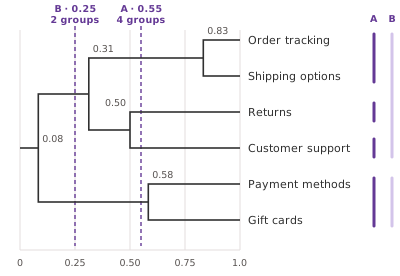 Root on the left, leaves on the right. Leaves, top to bottom: Order tracking, Shipping options, Returns, Customer support, Payment methods, Gift cards. Order tracking and Shipping options join at similarity 0.83. Payment methods and Gift cards join at 0.58. Returns and Customer support join at 0.50. The orders pair and the Returns pair join at 0.31. Everything joins at 0.08. Cut A at 0.55 gives four groups: the orders pair, Returns alone, Customer support alone, the payment pair. Cut B at 0.25 gives two groups: the four cards on the top, and the payment pair.
Average pairwise similarity
One fixed tree, two cuts. Join positions indicate similarity; in this illustration a join sits at the average pair similarity between the two sides, computed from the twelve sorts on the matrix page. The bracket columns show the groups each cut produces.
Cut A0.554 groups
- Order tracking
- Shipping options
- Returns
- Customer support
- Payment methods
- Gift cards
Cut B0.252 groups
- Order tracking
- Shipping options
- Returns
- Customer support
- Payment methods
- Gift cards
How do you choose a cut?
There is no universally correct threshold. Choose a grouping level that helps answer your IA question, then inspect what it combines.
Cut A at 0.55 keeps four groups. It preserves the orders pair and the payment pair while leaving Returns and Customer support separate. Use this cut to start with the stronger pairs and leave the other placements open.
Cut B at 0.25 produces two broader groups. It combines the orders pair with Returns and Customer support. That gives you a broader candidate section, but it includes weaker relationships: Order tracking and Customer support were grouped together in only two of the twelve illustrative sorts.
Try nearby cuts and check the matrix where memberships change. A grouping that persists is less sensitive to the exact threshold; persistence alone does not validate the navigation.
The level of detail you need in the IA, and the number and contents of groups participants created, can guide the choice. Neither dictates the right cut.
Turn the chosen grouping into a labeled candidate sitemap and tree-test it on realistic tasks. If participants repeatedly organized the cards in different ways, inspect Mental Model Detection before relying on the pooled tree alone.
Persistent groups
A group that holds across nearby cuts is less sensitive to the exact threshold; UXbeam labels the strength of each group at the current cut. Persistence across cuts tells you the grouping does not depend on one exact cut. Whether the sample contains one mental model or more is a different question: the dendrogram pools everyone, and Mental Model Detection separates those mental models.
Boundary cards
A small threshold change can split or merge a grouping. Inspect affected cards in the matrix and individual sorts; Cards between groups is a separate diagnostic prompt. Treat each as a question rather than a placement: go to its matrix row, see which partners it has in each direction, and write a tree test task about it. Boundary cards are candidates for cross-links or duplicate destinations in the finished navigation.

Singletons
A card that stays alone across cuts has no strong partner in this set. Three explanations: the card is standalone and may need a separate location; the card was unclear and people placed it at random; or the set is missing the cards it would have joined. The individual sorts and any description-reveal counts can help you investigate these possibilities.
One tree for everyone
The dendrogram pools every included sort into one structure. When participants broadly agree, the tree is a fair summary. When two groups of participants organize the cards on different rules, the tree blends them and can describe a structure that no participant proposed. The pooled tree alone cannot identify the participant groupings behind its joins. The matrix and the dendrogram are both built from the pooled sorts; Mental Model Detection identifies recurring ways participants organized the cards. Use it to investigate different mental models that a pooled similarity matrix or dendrogram may obscure.
Not a navigation
The groups at a cut are not a menu. Use participant-written category names when developing labels for the candidate groups. Their nesting is similarity, not the levels of a navigation; a group's sub-branches are not sub-sections unless you decide they are. The path from tree to navigation is Sitemap +, which opens the current cut as an editable draft, and then a tree test with tasks for important placements and labels.